The Best Small AI Models to Run Locally: A Tiny Toolkit for Your Laptop
qwen3.5:4b-q4_K_M, the same model from part two of this series, already drafts, explains and answers everyday questions completely offline on an ordinary 16GB laptop. It is a solid general assistant. It is not the model that should also search your files or handle a coding task, and treating one download as the answer to every job is how a laptop ends up with one overloaded model instead of three small ones that each earn their place.
Having control over a local AI setup means making explicit choices: which model, which engine, which licence, and which data stays where. If you have not checked your laptop's RAM or VRAM yet, read how much RAM your laptop needs for local AI first. If you have not installed Ollama, set up your first local AI provider walks through that. This page assumes both are done, and answers what comes next: which models, and how do you know if one is any good?
The Best Small AI Models to Run Locally, by Job
A useful local AI toolkit covers three separate jobs, not one model trying to do all three.
A general assistant, for everyday chat, drafting and quick questions: qwen3.5:4b-q4_K_M, a 3.4GB download, the same tag from part two.
A compact specialist, for a narrower job like structured output or a constrained reasoning task: granite4.2:3b, a 2.2GB download under the Apache 2.0 licence, released in August 2026. Section 6 below covers the other specialist options, coding, maths, vision and translation, so you can swap this slot for whichever job you have.
An embedding model, for searching your own documents: embeddinggemma:300m, a 622MB download. This one does not chat. It turns text into the vectors a retrieval app searches, covered in full in section 8.
Three separate downloads add up to roughly 6.2GB on disk. That is not one combined memory allocation: keeping all three loaded at the same time can still exceed a laptop's free memory. The practice is one model loaded per job, measured on a real task, with anything that does not earn its place removed.
What Quantization Changes
Quantization is easiest to see within one model family. Ollama lists qwen3.5:9b-q4_K_M at 6.6GB, qwen3.5:9b-q8_0 at 11GB, and qwen3.5:9b-bf16 at 19GB. Same weights, three different precisions, three different download sizes.
These are catalog download sizes, not a guarantee of loaded memory. Lower precision shrinks storage and often shrinks loaded memory too, but any loss in output quality depends on the model, the quantizer and the task: never assume it away, and never assume it is free.
Loaded weights are also not the whole story. The context window and its key-value cache, plus whatever else is running, still need headroom on top. A quantization win that frees up memory does not by itself guarantee a bigger model fits: it just makes the attempt more realistic than trying the full-precision file first.
Two Naming Traps That Get You the Wrong Download
Two labels in this catalog are easy to misread, and both cost you the wrong download.
Trap one. Google's own card calls Gemma 4 E2B a model with 2.3B "effective" language parameters. That sounds like a small file. Its actual Ollama download is 7.2GB, nearly as large as the gemma4:12b Q4 tag at 7.6GB. Read the download size, never the parameter label, when you are deciding what your laptop can hold.
Trap two. An unqualified tag can silently select the wrong model. Pull bare granite4.2 and you get the 8B model at 5.3GB, not the 3B tag at 2.2GB from section 2. Pull bare qwen3-embedding and you get the 8B model at 4.7GB, not the 0.6B tag at 639MB used in section 8.
The fix is the same both times: always pull the exact, fully qualified tag, never a bare family name, and check the size that downloads before you assume it matches what you meant to test.
The Context Window Ollama Gives You by Default
A catalog maximum such as 128K or 256K tokens states what a model can accept in principle. It is not a promise that your 16GB laptop can afford it.
Ollama defaults to 4,096 tokens of context. You can raise it, but memory grows with both a longer context and more parallel requests. The num_ctx: 4096 setting from part two of this series is that same conservative default, not an arbitrary round number.
Start a new model at 4K to 8K tokens with one session running at a time, and watch your system memory as you go. Grow the context only once you have seen it hold steady, not because the catalog page says you technically could.
Picking the Best Small AI Models for a Specialist Job
There is no single best specialist here, only the job in front of you, and a handful of small models worth testing against it.
Coding: qwen2.5-coder:3b (1.9GB) or the larger qwen2.5-coder:7b (4.7GB), both Apache 2.0.
Constrained maths or logic: phi4-mini:3.8b (2.5GB), from Microsoft.
Image and screenshot questions: gemma4:e2b (7.2GB) or gemma4:12b Q4 (7.6GB), both Apache 2.0, both listing text and image input.
Multilingual writing or translation: aya-expanse:8b (5.1GB), built for 23 languages.
One licence caveat matters here, stated plainly rather than buried in a footnote: Aya Expanse 8B carries a CC-BY-NC-4.0 licence with additional terms, noncommercial. Do not treat it as an unrestricted default sitting alongside the Apache-licensed options above it. granite4.2:3b from section 2 remains the general-purpose reasoning pick if none of these four match your job.
Test on your own task before settling on any of them. A specialist earns its place the same way the assistant did: by helping with something you asked it to do, not by topping somebody else's chart.
Test Before You Trust: A Five-Task Method You Can Repeat
Five short tests tell you more about a model than any catalog page. Run the same five on every candidate, using your own material.
1. A grounded summary. Give the model a 250 word note and ask for three action items, each with the sentence it came from. Mark anything it states without support in the text.
2. Structured extraction. Invent five appointments with names and dates, ask for JSON with exactly the fields you specify, then check all five against what you wrote.
3. Code repair. Give it one small failing function and one test. Record whether the test passes after its fix, using the same repository and context for every model you compare.
4. A language pair. Have a fluent reader check that a realistic paragraph keeps its names, numbers and nuance after translation. Never judge multilingual quality from an English-only prompt.
5. An image question, for vision models only. Show a chart or screenshot with a checkable answer, and confirm the image itself was sent, not just its filename.
For each run, record: correctness against your known answer, whether it followed instructions, anything it invented, time to its first visible output, total time, token counts, and whether it ran on CPU or GPU. Score usefulness and speed separately: a model that reasons before answering can spend real time on tokens you never see.
A Tiny Document-Search Extension (Local RAG)
The embedding model from section 2 has one job: turning text into vectors a retrieval app can search. It does not answer questions on its own.
The sequence runs in order: your files get split into chunks, an embedding model turns each chunk into a vector, a local vector store holds them, your query gets turned into a vector too, the closest chunks come back, and only then does a chat model answer, using those retrieved chunks and citing them.
The chat model was never trained on your documents. It only sees whatever the retrieval step hands it, at the moment you ask.
A small demo proves the idea without much setup: index five notes you already have. Write one question with an answer sitting in one of them, and a second question with no answer anywhere in the set. A working setup retrieves and cites the right passage for the first question, and admits it has no evidence for the second, rather than inventing one. Measure retrieval and the final answer as two separate things.
Check the embed tag explicitly before you download it, embeddinggemma:300m or qwen3-embedding:0.6b, for the same bare-tag reason as section 4.
Why Fewer Active Parameters Does Not Mean Less to Store
A model labelled something like "26B A4B" activates only a fraction of its parameters for each token it generates. It still has to store or stream its full 26B weights somewhere. Fewer active parameters is not the same as a smaller file, and it is not the same as a smaller memory footprint either.
No newly measured benchmark numbers appear anywhere in this toolkit. Where a figure comes from somewhere else, such as one person's report of roughly 18.5 tokens per second on an unusual 26B mixture-of-experts setup with an older CPU and a 6GB GPU, treat it as exactly that: one setup, on one person's own hardware, never a general expectation for every model carrying that label.
The Machines This Toolkit Was Written Against
This toolkit was tested against two real, current laptops, the same two from part two of this series: an entry Apple Silicon machine and a Windows workstation with its own dedicated graphics memory. Both are refurbished (professionally tested, cleaned and reconditioned) and covered by a 12-month warranty on refurbed, and either one comfortably runs the toolkit above, one model loaded at a time.
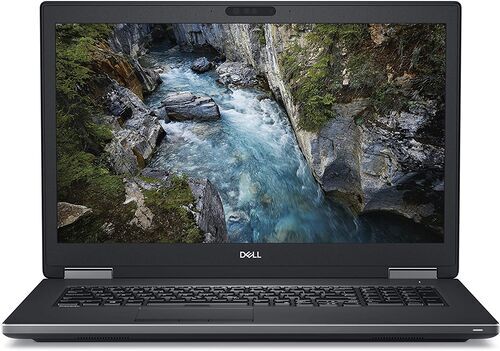
The MacBook Air (2026) 13 inch with M5 chip ships with 16GB of unified memory as standard, configurable up to 32GB. The Dell Precision 7730 pairs 32GB of system memory with its own 6GB of dedicated NVIDIA VRAM: two separate pools, not one combined figure.
Neither is a sales pitch here. They are what this guide was measured against, so you can compare your own machine to something concrete instead of a marketing spec sheet.
Licences, and Keeping the Shortlist Honest
Licensing runs per exact model, not per family. Qwen3.5 4B, Qwen2.5-Coder, Granite 4.2 3B and Gemma 4 E2B all carry an Apache 2.0 licence. Aya Expanse 8B carries CC-BY-NC-4.0 with additional terms, noncommercial, as section 6 already flagged. Being able to download a model's weights, holding copyright permission to use them, and "owning" the underlying model are three different things: check the current card for the exact model you pull, not the family name.
Keeping a toolkit small is a habit, not a one-time decision. ollama rm removes a download that never earned its place, for example ollama rm aya-expanse:8b once you know you will not use it. ollama ls and ollama ps show you what is actually on disk and what is actually loaded. Catalogs change, so revisit the shortlist rather than trusting a choice you made months ago.
Small models can still invent a passage, miss a nuance in another language, or write code that looks right and fails its test. Treat every recommendation here as your own experiment to run, never as a substitute for expert review on anything that matters.
Frequently Asked Questions: Best Small AI Models to Run Locally
Can I run all three toolkit models at once? Probably not comfortably on a 16GB laptop. Load one model for the job in front of you, then swap, rather than keeping a general assistant, a specialist and an embedding model all in memory together.
Do I need a GPU for the embedding model? No. embeddinggemma:300m is small enough to test on CPU alone, though it is still worth timing rather than assuming it is instant.
Will a bigger model always give a better answer? No. Whether a 4B or a 9B model wins depends on the task, which is exactly why section 7's five-task method exists instead of a single leaderboard number.
Is a Q4 download good enough? It depends on the task. Compare a Q4 tag against its Q8 sibling on your own three tests if you have the memory to run both, as in section 3.
Can I use Aya Expanse for a commercial project? Not by default. Its CC-BY-NC-4.0 licence covers noncommercial use, plus additional terms, so check the current model card before assuming otherwise.
Does the embedding model need the internet once it is downloaded? No, the same as every other model in this toolkit: once the weights are on disk, it runs offline.
Your Turn: Install, Test, Keep What Earns Its Place
Install the 4B assistant and one specialist that matches a job you have, on the laptop part one helped you size and part two helped you set up. Run your own three-question version of section 7's test. Keep whichever model helps. Remove the other with ollama rm. Only consider buying more memory once a real task, not a spec sheet, has told you that memory is the actual limit.
That closes this three-part series. If your own laptop turned out to need more memory first, the laptops category is a reasonable place to start.


Sign up for our newsletter for the first time and save 65 zł!
Never miss an offer again.
Information about the use of personal data can be found in our Privacy policy.
Get the refurbed app
For iOS and Android


Confirm sign-up
Almost done: We’ve sent you a confirmation email
- © Refurbed Marketplace GmbH
- Accessibility
- T&C
- Privacy Policy
- Imprint
- Legal Notices
- European Data Act
- Cookie Policy