Laptop vs desktop: how to find the right setup
Laptop vs desktop is a question about your whole setup: the computer, the desk it sits at and the places where you work. The advice here covers Windows and Linux computers.
For many people, a good laptop plus a properly equipped desk is the strongest default. You get one working environment, mobility when you need it and a full-size screen and keyboard at home. Everyday work such as writing, research, calls and browsing seldom needs a desktop processor or a dedicated graphics card.
A desktop earns its place when the work stays at one desk and needs sustained power, more memory or storage, room to expand or extra reliability. Think of video or 3D renders that take a long time, large development projects, AI that runs on your own computer and demanding games. Owning both makes sense when each machine has its own job.
Here's how to test each choice against your own week, whether you're considering a laptop or a desktop.
Contents
- What you are comparing: eight kinds of computer
- What mobility means: four different needs
- Your workspace can matter more than a faster processor
- What a desktop adds: steady speed on long jobs, more memory and storage, and replaceable parts
- Laptop or desktop? A starting point for each kind of user
- Before you buy, find out what limits you: memory, storage or graphics
- Software and support decide what the hardware can do
- Five ways to set up your computers, and what each one requires of you
- What a laptop or desktop costs to own over its lifetime
- How to decide, and how to test the choice before you keep it
- Frequently asked questions about laptops and desktops

What you are comparing: eight kinds of computer
'Desktop' and 'laptop' each cover machines with different strengths. Eight kinds are worth telling apart:
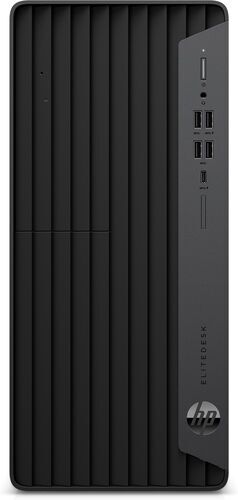
- Conventional tower: it gives you sustained performance, replaceable parts and internal expansion. It needs space and separate peripherals.
- Small tower or small-form-factor PC: you get desktop flexibility in less space, with tighter cooling and power limits.
- Business micro PC or mini PC: it's a compact computer for a permanent desk, often built on a mobile processor, and how far you can expand it varies widely.
- All-in-one: it makes for a tidy installation, though you have to replace the screen and the computer together.
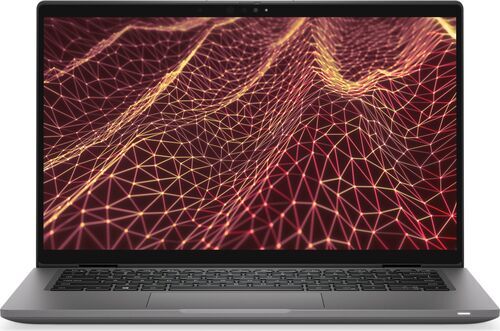
- Thin-and-light laptop: it gives you everyday mobility with your whole working environment on one machine, but little room to expand and less sustained cooling.
- Mainstream 15 to 16-inch laptop: you get more built-in screen space and sometimes better value, but there's more to carry.
- Gaming or mobile-workstation laptop: it delivers serious computing in several places, at the cost of a bulky charger, noise, heat and a higher price.
- Repairable or modular laptop: you can replace wear parts and keep it in service longer, though part supply and upgrade costs still matter.
A small desktop isn't automatically as capable as a tower, and a large laptop isn't automatically fast. Recent chips improved integrated graphics and the efficiency of several laptop families, but the physical limits remain: a laptop fits its battery, screen and cooling into a portable body. An 'AI PC' label doesn't change those limits.
What mobility means: four different needs
'I need to move around' can mean four different things:
- Moving between rooms at home: any laptop covers it, and a desktop doesn't.
- Commuting between two equipped desks: each desk keeps its own screen, keyboard and charger, so even a large workstation laptop works well.
- Working on a train or in a café: you need a light laptop with good battery life and a charger you can carry. A large workstation laptop is a poor fit here.
- Giving a demonstration at a client site without a connection: you need a laptop that runs everything locally. A large workstation laptop can do this well.
Portability can help you get more done even when it lowers benchmark speed: a computer that's in the meeting is more useful than a faster one in another room. The same availability can make it harder to stop working, while a stationary computer can mark where the working day begins and ends.
A laptop's battery life depends on the whole machine: processor family, screen, firmware, power mode, graphics behaviour and software all play a part. In 2026, preferring Arm processors over x86 ones for battery life alone is too crude a rule. Judge a laptop by how long its battery lasts in your own work, how reliably it sleeps and wakes, and how much its charger weighs in your bag.

Your workspace can matter more than a faster processor
Monitor placement, keyboard, mouse, chair, lighting, microphone and network quality can shape your day more than a faster processor. A laptop and a desktop can share the same excellent desk.
A laptop used on its own ties the height of the screen to the position of the keyboard, so eight hours on one feels different from eight hours at a proper desk. An external keyboard and mouse let you raise the screen, and an external monitor can make a docked laptop as comfortable as a desktop. A desktop with a badly placed screen is still uncomfortable. The monitor eye strain guide helps you choose a screen.
More screens help when you need reference material, want to keep an eye on something or compare things side by side, but they take space and keep distractions in view. Start from how much screen space you need, then pick one larger monitor, two screens or an ultrawide.
- The dock or port: USB-C names a connector, not what the port can do. Check the data speed, the display support and the cable, and compare the charging power the laptop accepts with what the dock delivers. A charger that connects can still fall short under heavy load, and some powerful laptops need their own adapter at the desk. See docking stations.
- The network: Ethernet is often a more useful upgrade for a stationary workstation than a newer Wi-Fi standard.
What a desktop adds: steady speed on long jobs, more memory and storage, and replaceable parts
A desktop's lasting advantage is spare capacity: cooling that lets it hold its speed through long jobs, room for more memory and storage, and parts you can replace. This advantage doesn't make every desktop faster than every laptop.
What counts is the time that blocks you. Cutting a nightly export from forty minutes to twenty changes little if you're asleep, while cutting a repeated preview from twenty seconds to five can change a whole working day. A desktop pays off when it shortens the many tasks that make you wait.
In 2025, Puget Systems tested its Mobile 16 workstation laptop while plugged in. It trailed a comparable desktop by roughly 10 to 20% in photo applications, came close to high-end desktops in some DaVinci Resolve tasks and fell well behind in GPU-heavy Unreal Engine tests. Puget sells such systems, so treat the results as evidence about those tasks, not as a verdict.
Names can mislead too: NVIDIA specifies 24 GB of video memory for the RTX 5090 Laptop GPU and 32 GB for the desktop RTX 5090, and their power limits differ. Pick the task you want to speed up and look for results for that task. The desktop PC buying guide explains how the parts work.
Laptop or desktop? A starting point for each kind of user
A job title is only a first guess: a writer who manages huge research archives can demand more of a computer than an engineer who works mostly with tools that run on remote computers. Use these as starting points.
- Office, writing, research and browser work: start with a laptop and an external screen and keyboard. If you almost never travel or strongly want to swap parts, a desktop suits you better.
- Meetings, travel, study or frequent moves: choose an efficient laptop and a modest desk setup. Add a desktop only if heavy work stays in one place.
- Home professional at one desk: compare a laptop with a compact desktop. Heavy computation, many peripherals or growing memory needs favour a tower.
- Programming: a laptop with enough RAM suits ordinary builds. Large projects, many virtual machines or long builds favour a desktop, and work that runs on servers needs only a comfortable laptop.
- Photo and design: start with a quality laptop and a good monitor. Large batches, demanding effects or huge files can justify a desktop.
- Video and motion work: weigh footage, effects, memory and travel. Heavy compositing and long exports favour a desktop, and field editing can justify a powerful laptop.
- CAD, engineering and simulation: choose a desktop for stationary work or a capable laptop for work on site. Certified drivers and your exact software can outweigh generic performance rankings.
- Gaming at home: start with a desktop. Frequent moves can justify a gaming laptop, and casual play may need only a good integrated GPU.
- Local AI: start with a desktop or a carefully chosen high-memory system. Model size, software and memory decide whether a laptop is enough.
- Shared household: a desktop or all-in-one is easy to share, and a laptop is easier to put away. Separate user accounts matter whichever you choose.
Before you buy, find out what limits you: memory, storage or graphics
More memory helps when memory is the limit, and a graphics card helps software that can use it. Impressive numbers bought without a named limit often leave the real problem unsolved.
- RAM: a sensible start is 16 GB for an ordinary new computer, 24 to 32 GB for heavier multitasking and 32 to 64 GB or more for serious video work and many virtual machines. Puget Systems' 2026 tests found meaningful performance penalties at 16 GB for content creation. Laptop memory is often soldered, so check the exact model.
- Storage: a decent SSD is the baseline: 512 GB is workable and 1 TB comfortable. Capacity and free space usually matter more than top speed, and a second internal SSD is an advantage of a desktop.
- Graphics: integrated graphics cover everyday work, video, many creative tasks and some games. A dedicated card pays off when a specific task needs its power, memory or software support, such as demanding games, GPU rendering or local AI. Video memory can set a hard ceiling.
- Processor: a model tier says little. Compare the exact model, its sustained power and cooling, and how it runs the application you use.
Some features and labels deserve less weight until a task you can name benefits from them: an 'AI PC' badge, PCIe 5.0 peak speeds, frame generation in games, Thunderbolt 5 and Wi-Fi 7. A Thunderbolt 4 or well-specified 40 Gb/s USB4 setup already serves many desks. For local AI, start with the AI laptop RAM and VRAM guide.
Software and support decide what the hardware can do
Check the software before you pick the chip.
- Windows on x86-64 (the long-established PC processor design): it has broad support for professional apps, peripherals and PC games. Check the exact application version, the drivers and any workplace requirement.
- Windows on Arm: it's a good fit for an efficient laptop when your apps run natively. Emulation doesn't remove the need for Arm drivers, so test your VPN, security software, plug-ins, anti-cheat tools and USB devices.
- Linux on well-supported hardware: it works well for development and administration. A desktop lets you choose parts known to work, while a laptop depends on firmware and drivers for sleep, cameras, graphics switching and docks. A hardware certification covers one configuration, not related models.
Then check the support horizon. As of October 2026, regular support for Windows 10 22H2 ended on 14 October 2025, and consumer Extended Security Updates run through 12 October 2027 for eligible, enrolled devices: security coverage, not full support. Windows 11 needs a supported processor, TPM 2.0 and UEFI firmware with Secure Boot. Judge how long a used computer will stay supported together with its speed: a fast machine that can't stay supported is a poor purchase.
'AI computer' can mean four different things: a cloud assistant that runs on remote servers, an operating-system feature that runs on the NPU (neural processing unit), a creative app that runs on the GPU, and a language model that runs on your own computer, limited by memory and its software. A cloud assistant generally needs no powerful NPU, and Copilot+ needs one rated 40 TOPS or more, 16 GB of memory and 256 GB of storage. Name the feature you want before you pay extra.
Five ways to set up your computers, and what each one requires of you
Two computers mean coordination work: files, licences, software versions, settings, updates and recovery all have to be kept in step. The second machine must earn that upkeep.
- One laptop, several desks: the laptop travels, and each desk supplies a screen, a keyboard, power and a network connection. Losing the laptop loses everything, so keep an independent backup.
- Desktop for heavy work, laptop for mobile work: decide the split in advance, for example photo preparation on the laptop and large exports at the desk. Move active projects with the application's own transfer method, rather than improvised sync.
- Desktop as host, laptop as remote terminal: use SSH or remote development for code, Remote Desktop for many Windows tasks and streaming for graphics. The laptop still needs a good screen, good input devices and a good network, and a fast speed test doesn't prove a responsive connection. Keep the host wired and avoid exposing a Remote Desktop port to the internet.
- Employer laptop plus personal desktop at one desk: share one monitor and keyboard through a KVM switch (it routes them to either computer) or a monitor with a built-in one. Hardware switching needs no software on a managed laptop, and sharing a keyboard doesn't mean mixing work and personal files.
- Laptop plus external graphics card: you keep one environment and gain desk graphics, but only with a combination documented to work. The enclosure and power supply can take a large share of a desktop's price, and the laptop's processor, memory limit and cooling stay as they were.
Give each important project one clear home. Sync can spread a mistake as efficiently as a good change, so keep a tested backup, and don't sync live databases or virtual machine images that you edit on both computers. One system administrator found that a desktop kept for local virtual machines became a second environment to maintain once server access arrived.
What a laptop or desktop costs to own over its lifetime
Compare complete systems. A laptop quote includes the screen, battery, keyboard and camera, while a desktop owner may already own better peripherals. A laptop at a desk can still need a monitor and a dock.
Add up the same items for every option: equipment, peripherals, software and services, energy, repairs or replacement and the cost of interruptions, then subtract what reselling or reusing brings back. Use the same number of years and the same needs for every option, and don't count upgrade savings as certain.
An extra 20 W running around the clock adds 175.2 kWh a year, and the same 20 W for 8 hours on 250 working days adds 40 kWh. Multiply by your own tariff. A processor's rated power isn't what the computer draws from the wall, and leaving a desktop awake all day can erase the energy benefit of finishing jobs sooner.
An upgrade path is worth something only if you'll use it. A replaceable battery that restores a laptop's mobility is often worth more than a vague promise of future processor upgrades. Standard desktop parts usually give broader upgrade options, while proprietary desktops and compact mini PCs need a check of what can be replaced.
Refurbished means professionally tested, cleaned and reconditioned until a product is hard to tell apart from new. Every refurbed purchase carries a minimum 12-month warranty and a 30-day return window. Keeping suitable equipment in service avoids a needless replacement, while owning two machines means making two. Without product data, neither 'laptops are greener' nor 'desktops last forever' is a safe claim. The laptop buying guide helps you narrow the choice.
How to decide, and how to test the choice before you keep it
Here are seven rules to keep in mind:
- Laptop first: choose a laptop when mobility is real, your work runs on the laptop itself and one environment is worth keeping.
- Desktop first: choose a desktop when the important work is stationary and needs sustained power, capacity, expansion or simple part replacement.
- Both: use both when each machine has its own job and moving work between them is simple enough to maintain.
- A powerful laptop: choose one when demanding work must travel and run on the laptop itself. Judge it together with its charger and how often it must be plugged in.
- Remote access: use it when keeping the computing in one place helps and your network is good enough for the task.
- An external graphics card: consider one only for a combination documented to work, and count its full cost.
- Keep your current computer: do that when a monitor, more memory or storage, a new battery, a software change or a better routine fixes the real problem.
Before you shop, record one ordinary week. Note where you needed a full computer and what felt slow, noisy or awkward. List what already works, the software and devices you can't do without, and the limit you want to get past.
Then test the computer you chose during the return window, with your own apps, projects, peripherals and desk rather than benchmarks alone. Repeat the tasks that make you wait. On a laptop, work a full session on battery, calls included. With a dock, check that screens, Ethernet, audio, camera and charging come back consistently after you reconnect. Read real text on the screen in your own room. And restore a sample file from your backup, with your encryption recovery key and your account's sign-in details kept apart from the computer.
The most revealing question comes last: which useful capability will this purchase add to an ordinary week, and how often will you use it?
Frequently asked questions about laptops and desktops
Is a laptop or a desktop better for working from home? A laptop with an external screen and keyboard suits many home offices and lets you take one environment with you. A desktop wins when you work at one desk and need sustained computation, many peripherals or more memory over time.
Is a desktop faster than a laptop? Often for long, heavy jobs, but not for every task. A desktop can handle more power and cooling and hold more memory, so it keeps its speed in renders and long exports. For short interactive tasks, a good laptop can feel as quick.
Can a laptop replace a desktop? Yes, for most office work. With a monitor, keyboard and dock, a laptop becomes a complete desk setup, so check that the dock supports your screens and can charge the laptop while it works hard. Long renders, large projects, local AI and demanding games still favour a desktop.
Is a desktop cheaper than a laptop? Not by default. A laptop price includes the screen, battery, keyboard and camera, while a desktop owner may already have better peripherals. Compare complete setups over the same number of years, and count energy, repairs and licences too.
Does a desktop last longer than a laptop? Not automatically. A desktop with standard parts offers more ways to replace what ages, and a laptop with a replaceable battery can gain years from one part. Proprietary desktops and compact mini PCs can limit upgrades, so ask what can be replaced and at what cost.
How much RAM do I need? 16 GB is a sensible start for a new computer used for general work. 24 to 32 GB suits heavier multitasking, and 32 to 64 GB or more suits serious video work and virtual machines. 8 GB can do for light use, but laptop memory is often soldered, so choose before you buy.
Do I need a dedicated graphics card? Only if a specific task needs one. Integrated graphics cover everyday work, video, many creative tasks and some games. Demanding games, GPU rendering and many local AI tools can justify a dedicated card, and its video memory can set a hard ceiling.
Is a gaming laptop as good as a gaming desktop? For gaming at home, a desktop is the stronger default, and a gaming laptop makes sense if you often take your computer with you. Compare the exact graphics chip, because names mislead: NVIDIA lists 24 GB for the RTX 5090 Laptop GPU and 32 GB for the desktop card.
Should I own both a laptop and a desktop? Only if each has a job you can name, such as a desktop for heavy work at your desk and a light laptop for meetings and travel. Two computers mean two sets of files, licences, updates and recovery plans to keep in step.
Is a mini PC a good alternative? Yes, for a permanent desk with modest demands. Many mini PCs use mobile processors, and how far you can expand their graphics and memory varies. Small doesn't mean quiet: one 2026 test of a compact desktop found low power use at idle but audible operation, and much more noise when it worked hard.
Do I need an AI PC? No, unless a specific feature you use runs on the computer itself rather than in the cloud. A cloud assistant works on any computer. Copilot+ features need a neural processing unit (NPU) rated 40 TOPS or more, 16 GB of memory and 256 GB of storage. A large model that runs on your own computer depends mostly on memory.
Should I keep my current computer? Yes, if it still gets security updates and the real problem has a smaller fix: a monitor, more memory or storage, a new battery, a software change or a better routine. Replace it when the computer itself is the limit you can name.
Find the laptop or desktop that suits how you work
Start with what your week needs, then choose a computer and a desk setup to match. Every refurbed purchase carries a minimum 12-month warranty and a 30-day return window, so you can test the whole setup at home.
If a desktop suits you better, browse refurbished desktops.

Sign up for our newsletter for the first time and save 65 zł!
Never miss an offer again.
Information about the use of personal data can be found in our Privacy policy.
Get the refurbed app
For iOS and Android



Confirm sign-up
Almost done: We’ve sent you a confirmation email
- © Refurbed Marketplace GmbH
- Accessibility
- T&C
- Privacy Policy
- Imprint
- Legal Notices
- European Data Act
- Cookie Policy